
The case file
A window fills her screen. A siren sound plays. It says her computer is infected, and it gives her a number to call. The number is the entire scam.
Four case files ago we opened the family emergency call. Last week, the Medicare season. Tonight we open the file that costs Americans more money than almost any other phone scam: tech support fraud. In 2025 it crossed one billion dollars for the first time, and adults sixty and older account for nearly half of that. It usually starts exactly like this.
What you're watching is a dramatization. Eleanor is a composite character. The pop-up, the script and the second call are reconstructed from patterns documented by the FTC and the FBI.
She's paying bills online. The screen goes white, then red. A voice, not a person, starts talking. "Your computer has been compromised. Do not restart or shut down your computer." A phone number sits under the warning, next to a logo that looks exactly right. She calls it.
Thank you for calling Microsoft Certified Support, my name is Kevin, badge number four four one two. I can see from our system that your computer sent us an automatic alert. I know this is frightening, but you called at the right time. I just need you to open something called Event Viewer for me, so I can see how deep the infection has gone.
The "technician"
Notice what just happened. He gave himself a company name, a fake badge number, and immediately told her not to panic, which is exactly how you keep someone calm enough to keep following instructions. Event Viewer is a real tool built into every Windows computer, and it is full of ordinary, harmless log entries: driver updates, routine warnings, background tasks. To someone who has never opened it before, a screen full of red and yellow warning icons looks like proof of a disaster. It is not. It is what every healthy computer's log looks like, every single day.
Then comes the part that turns a scary pop-up into an actual theft: he asks her to download a program. AnyDesk. TeamViewer. Zoho Assist. The names sound technical and official. What they actually do is give a stranger on the other end of the phone full control of her mouse and keyboard, from wherever he is.
Here is the rule, and it comes straight from the FTC. Real security warnings from Windows, from Apple, from your antivirus, never include a phone number to call. Microsoft does not monitor your computer. Microsoft does not call you. If a warning has a phone number in it, that number is the scam, not the fix.
She hangs up before installing anything, a little shaken, and closes the browser through the task manager instead of clicking anything on the screen. That should be the end of it. Six weeks later, it isn't.
Before we get to that second call, understand why the first one worked, because it isn't luck and it isn't carelessness. That pop-up is built by people who study exactly one thing: how to make a browser window impossible to close calmly. It fills the entire screen. It plays a siren. Some versions won't let the "X" in the corner respond to a click at all – they trap the browser in a loop that reopens the same warning the moment you try to leave. The real fix, if this ever happens to you, is to never touch anything inside that window. Press Control, Alt, Delete, open Task Manager, and end the browser process directly. That closes the trap without ever giving it the click it's waiting for.
And here's the tell that works every single time, because it never changes: a real security warning, from Windows, from your antivirus, from Apple, has never once in its history included a phone number. Microsoft does not know your computer exists until you contact them first, on a number you looked up yourself.
The call center on the other end of that first pop-up is rarely a single scam. It's often a pipeline, and the "technician" call is just the first sale.
A version of the same operation, documented by security researchers throughout 2026, arrives by email instead of a pop-up: a renewal notice, styled exactly like Norton or McAfee, saying your protection plan just auto-renewed for three hundred ninety-nine dollars and ninety-nine cents. There's an order number. There's a date. There's a button that says "Cancel Subscription," and next to it, a phone number for billing questions. You never bought this plan. That's the point – the fear of an unexpected charge is what makes people call.
Thanks for calling McAfee Billing Support, I do see the charge here, three ninety-nine ninety-nine, posted this morning. I can absolutely get that reversed for you right now – I just need to remote into your computer for about two minutes so our refund tool can process it correctly on your end. Can you go ahead and open your browser for me?
The "billing" call
Notice it's the same two moves as the pop-up, just wearing a different uniform: an unexpected charge instead of an unexpected infection, and the exact same request – remote access – offered as the only way to fix it. Once connected, some of these calls stop there, having gained control of the machine to install more of their own software. Others go straight into the routine you're about to hear: the fake refund.
Gift cards are the detail that ties all of this together. Across all the fraud reported to the FTC, close to one in four victims say they paid with a gift card – and among tech-support and business-impersonation scams specifically, gift cards are the reported payment about a third of the time, with a typical loss over that method alone above nine hundred dollars. Here's why gift cards specifically: once the numbers on the back are read aloud over the phone, the money is gone instantly, with no bank to call and reverse it. That is the entire reason the script always ends with "read me the numbers on the back of the card."
The same company calls back.
Mrs. Whitfield? I'm so sorry to bother you, this is urgent. Our billing system made an error on your account last month and refunded you nine hundred and forty dollars by mistake, it's already in your checking account. I am going to lose my job if I don't get this corrected today. I just need you to log into your online banking while I stay on the line, so I can confirm the amount and help you send the extra money back.
The "refund" call
Watch the shape of this call, because it is the mirror image of the first one. Instead of frightening her, it flatters her: she's owed money, and now she's the one being asked for a favor. While she's logged in and the connection from six weeks ago is still active on her machine, the number on her banking screen changes in front of her eyes. It looks like nine hundred and forty dollars just appeared. It didn't. Either the page is being edited live by someone with remote access, or the money came from another account of hers that she never checked. No bank, ever, corrects its own mistake by asking the customer to wire money back, buy gift cards, or send crypto. That is not how refunds work anywhere in the world. That is how a theft is made to look like an accident.
If you want the one habit that ends this entire category of scam before it starts, it's this: your bank has a real fraud and verification line printed on the back of your card, and it is never the number a caller gives you, ever, for any reason. A real refund from a real company shows up the same way the original charge did – same account, same method, no phone call required, and never followed by a request to send part of it back.
It's also worth knowing what a genuine support call looks like, because the difference is simple. Microsoft, Apple and your antivirus company will never call you first. You call them, using a number from their real website, typed in yourself – never a number from an email, a pop-up, or a voicemail. Save that real number in your phone under a name like "Microsoft dash Real Support," the same way we asked you to save a real bank number a few episodes ago, so that on the one day you need it, you're not searching under pressure.
The plan
Here is the plan for this entire file.
Step one: never call a number from a pop-up, an email, or a voicemail. If a warning has a phone number in it, it's fake, full stop.
Step two: if a warning appears, close it through your task manager, not by clicking any button inside the window itself, including the one that says close.
Step three: save the real support numbers before you need them – your bank's number from the back of your card, and Microsoft's or Apple's number from their real website – under names you'll recognize in a panic.
Step four: no legitimate refund is ever sent back by gift card, wire transfer or cryptocurrency. Not from a bank, not from Microsoft, not from anyone.
Step five: if you already gave remote access, disconnect the computer from the internet, and have someone you trust, or a real repair shop, check the machine before you use it again for anything involving money.
Step six: tell someone, the same evening, not after, in shame. Every case in this file got worse the longer it stayed a secret from the rest of the family.
A week after the second call, Eleanor sits with Chloe and finally tells her both stories, and Chloe does the one thing that would have stopped all of it from the very first pop-up: she calls the actual number on the back of Eleanor's bank card and asks them, directly, was any refund ever issued. There wasn't one. There never is.
Together they do the last five minutes of homework this file asks for. They open Eleanor's phone and save two numbers under names that read like instructions: her bank's real fraud line, and Microsoft's real support line, copied straight from Microsoft's own website, not from any email. Chloe writes one line on a card and tapes it to the side of the monitor, the same low-tech trick that has worked in every file we've opened so far: a phone number in a warning is the scam, hang up, call me.
If money already moved, call your bank first, then report it at ic3.gov and reportfraud.ftc.gov, and call the AARP Fraud Watch helpline, free, at 877-908-3360.
This case file is closed. Next time, the scam that doesn't ask for money at all in the first six months: it asks for your trust, one flattering message at a time, until the day it asks for everything. The romance scam playbook, all seven stages.
New file every week. Subscribe so you're never caught off guard.
- FTC Consumer Sentinel, 2025 data — tech-support losses crossed $1.041 billion: https://consumer.ftc.gov/articles/how-spot-avoid-and-report-tech-support-scams
- FBI IC3 — 2025 Internet Crime Report (losses among victims 60+): https://www.ic3.gov/AnnualReport/Reports/2025_IC3Report.pdf
- IC3 — tech-support impersonation / wire-transfer scam pattern advisory: https://www.ic3.gov/PSA/2022/PSA221110
- AARP — FBI/FTC 2025 losses summary: https://www.aarp.org/money/scams-fraud/fbi-ftc-report-2025-losses/
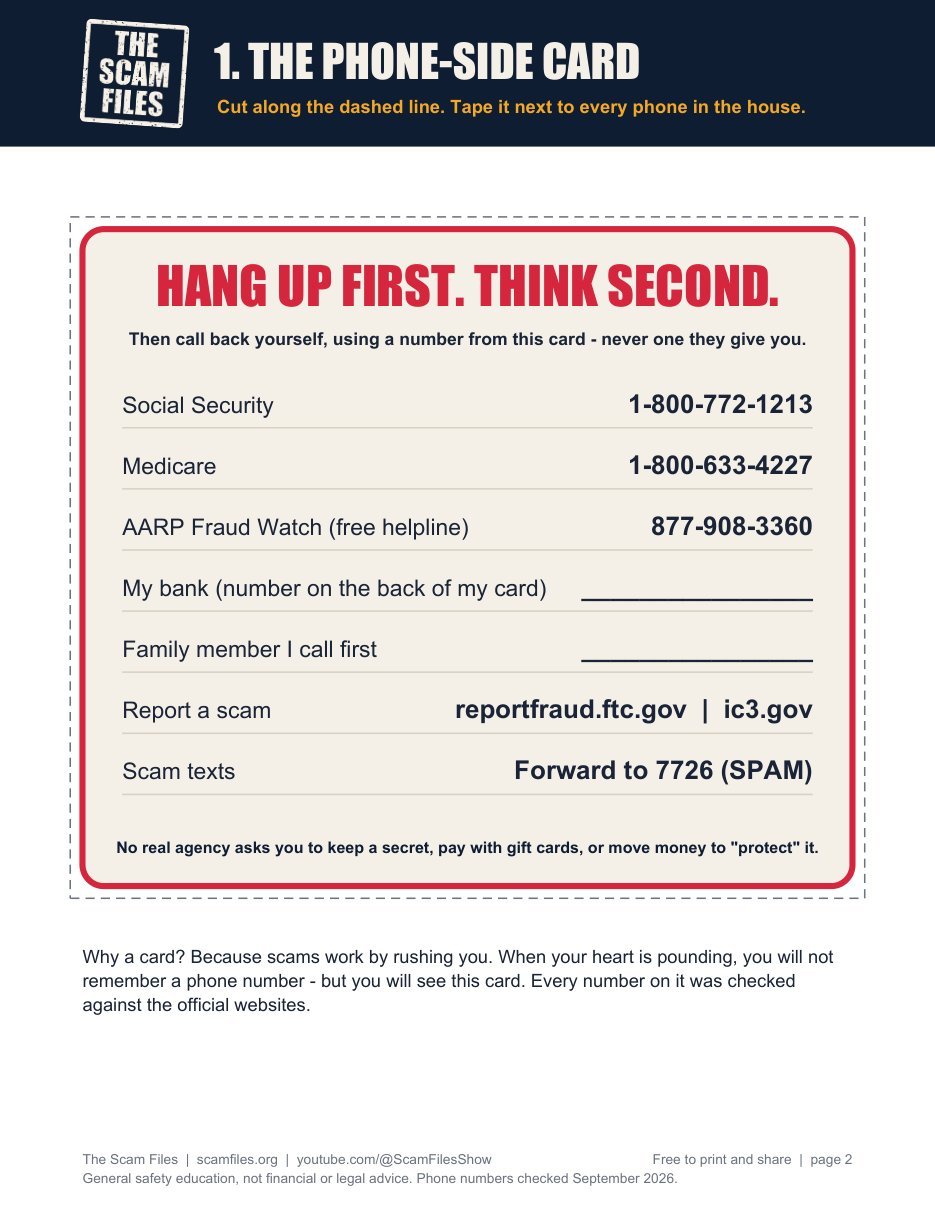
Keep this file by the phone
Print it and tape it by the phone. Six pages, free:
- The phone-side card with the real numbers
- 12 sentences that mean "hang up now"
- Your family safe word, and the 10 scams in one page
One short email a week with the newest case file. No spam, unsubscribe any time.